Call Us Today! 877-659-2467

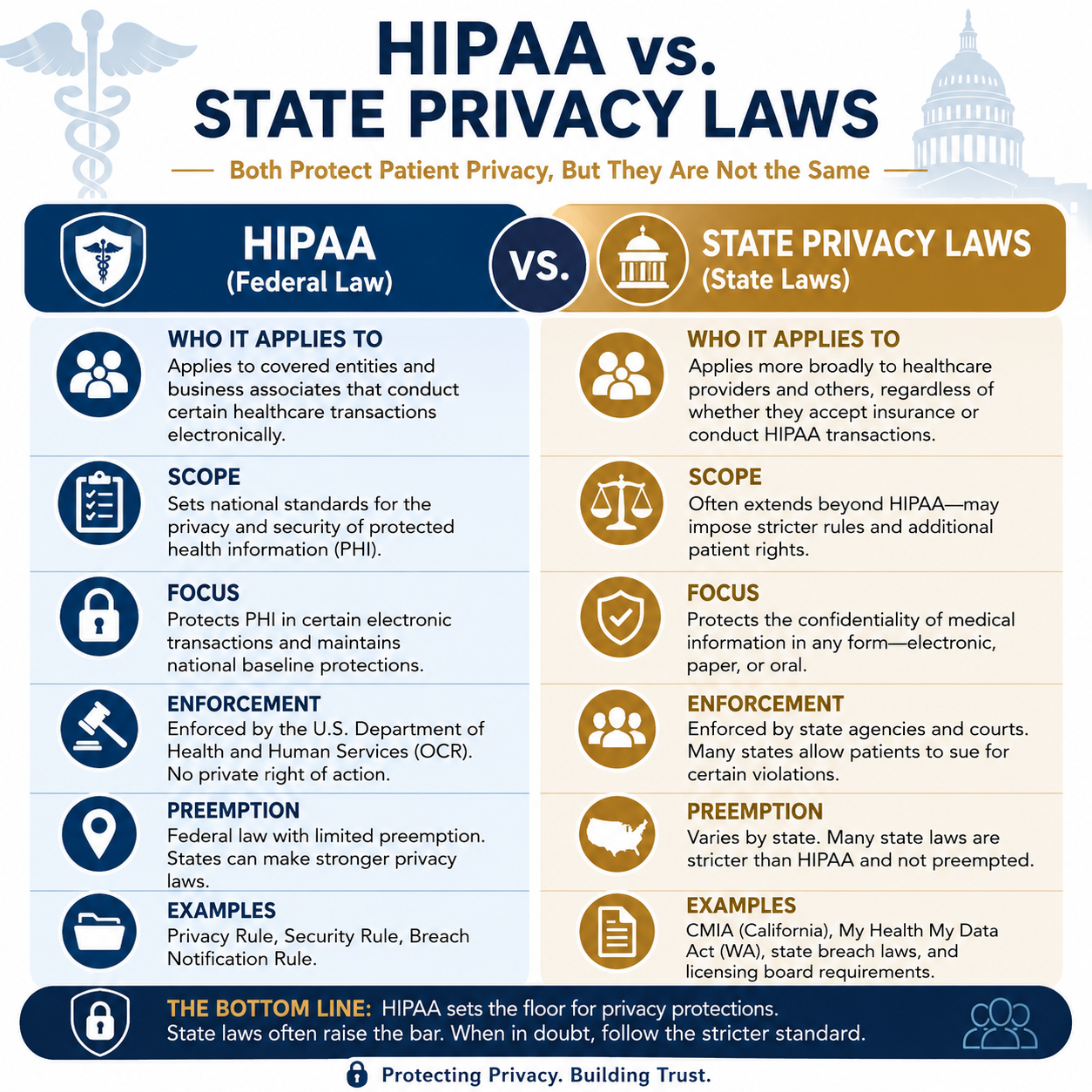
HIPAA vs State Privacy Laws

Many cash practices have the misconception that HIPAA does not apply to them. Well, that maybe true in some aspects, BUT… state privacy laws may actually be more stringent. In the coming years, more states will implement privacy laws to protect consumers from privacy and security failures due to the rise in cybercrime.

So, when practices compare HIPAA vs State Privacy laws, HIPAA sets a federal floor for covered entities. Cash practices escape HIPAA’s reach but land directly in a patchwork of state laws that can be equally or more demanding. The absence of HIPAA liability is not the absence of privacy liability.

What is HIPAA and Who Must Comply?

HIPAA (Health Insurance Portability and Accountability Act) applies to covered entities. This includes health plans, healthcare clearinghouses, and healthcare providers who transmit health information electronically in connection with certain standard transactions (like billing insurance).

If you never bill insurance and never transmit health information electronically for covered transactions, you are likely not a HIPAA covered entity.

Cash-Only or Direct-Pay Practices and HIPAA

Although a cash only or direct pay practice may not fall under the HIPAA rule guidelines there are other laws they must follow and still have significant legal obligations to protect patient information.

Specialized Federal Privacy Laws

Depending on the services provided, additional federal laws may apply, such as:

  • 42 CFR Part 2 for certain substance use disorder treatment records.
  • Federal protections for certain research records.
  • Privacy requirements related to employment or occupational health records.

Federal Trade Commission (FTC) Health Breach Notification Rule

The FTC Health Breach Notification Rule may apply to certain health apps, telehealth providers, and businesses that are not covered by HIPAA if they experience a breach of individually identifiable health information

Federal Trade Commission (FTC) Act

The Federal Trade Commission can investigate businesses that:

  • Misrepresent their privacy practices.
  • Fail to safeguard consumer information after promising to do so (this includes posting a HIPAA Compliant Seal on a website).
  • Engage in unfair or deceptive acts involving personal information.

State Privacy Laws Fill the Gap

  • Govern how long records must be retained (varies: 5–10+ years by state)
  • Define patient rights to access and amend their records
  • Authorized disclosures
  • Apply to all providers regardless of insurance billing status
  • Civil penalties for unauthorized disclosures
  • Protection of electronic health records

These laws often apply regardless of whether the provider accepts insurance.

State Medical or Dental Practice Licensing Boards
State licensing boards generally require licensed healthcare providers to:

  • Maintain confidential patient records.
  • Secure electronic records.
  • Maintain complete and accurate documentation.
  • Retain records for the required period.
  • Protect patient information from unauthorized access.

Failure to do so can result in disciplinary action, including license suspension or revocation.

State Consumer Health Privacy Laws
Several states have enacted broader health privacy laws that apply beyond HIPAA. Examples include:

  • California (CMIA) – California Confidentiality of Medical Information Act applies broadly, including to providers not covered by HIPAA. California Consumer Privacy Act (CCPA) and the California Privacy Rights Act (CPRA).
  • Colorado – Outlines five key rights for Colorado consumers, right to access, right to correction, right to delete, right to data portability, right to opt out.
  • Connecticut – The Connecticut Data Privacy Act (CTDPA) includes stronger data protections for children.
  • Florida, Texas, New York – each have specific statutes governing patient records, breach notification, and consent requirements.
  • Washington My Health MY Data Act (2023) – extends beyond HIPAA to cover consumer health data broadly.

Most states have implemented similar state privacy laws, some are more stringent, while others apply to larger entities. Keep in mind, these laws may apply even when HIPAA does not.

State Data Breach Notification Laws
All 50 states have breach notification laws. If an EHR containing patient information is accessed, stolen, or compromised, the provider may have to notify:

  • Affected patients.
  • The state attorney general (in some states).
  • Consumer reporting agencies (for large breaches).

The notification requirements vary by state.

Contracts with the EHR Vendor
Nearly every EHR agreement requires the practice to:

  • Maintain account security.
  • Control user access.
  • Protect passwords.
  • Report security incidents.
  • Use the software appropriately.

Violating these contractual obligations can create liability.

Does using an EHR create security obligations?

Even if HIPAA does not apply, using an EHR means the practice should implement reasonable safeguards such as:

  • Unique user accounts
  • Strong passwords or passkeys
  • Multi-factor authentication, when available
  • Encryption of devices and backups
  • Automatic screen locking
  • Audit logs
  • Routine software updates
  • Staff confidentiality training
  • Procedures for responding to security incidents

These measures are often considered evidence of reasonable care if a privacy dispute or data breach occurs.

Class Action Lawsuits

Medical data breaches carry significant class action lawsuit risk, as a single incident can expose personal health information. Plaintiffs’ attorneys have increasingly targeted healthcare providers, insurers, and their vendors following breaches, alleging failures to implement reasonable and appropriate security measures, violations of state privacy statutes, and in some cases HIPAA-adjacent state law claims. Even cash-pay practices that fall outside HIPAA’s reach are not immune: state consumer protection laws, medical records statutes, and common law negligence theories can all support class action claims when patient data is compromised. Courts have become more receptive to standing arguments in data breach cases, and the cost of defending, let alone settling a class action, can be devastating for a and size of practice. Inadequate data security is not just a regulatory risk; it’s a litigation risk that no practice can afford to ignore.

Smart practice even if not required:
Many cash-pay providers voluntarily adopt HIPAA-like privacy practices because:

  • It builds patient trust.
  • It provides a defensible compliance standard.
  • State laws often parallel HIPAA requirements anyway.
  • It simplifies operations if the practice ever accepts insurance later.

Protect Your Organization Before It’s Too Late

HIPAA compliance isn’t a one-time project, it’s an ongoing process. At Aris Medical Solutions, our HIPAA Keeper system simplifies compliance with a cloud-based platform that walks you through each requirement, step by step. From risk analysis to training and documentation, you’ll have everything you need to stay protected, compliant, and audit ready.

Protect your practice — and your patients.


Schedule a free HIPAA checkup today at Aris Medical Solutions. Your HIPAA Compliance Officer will have a HIPAA security analyst to guide and assist them every step of the way.
Class Action Lawsuits VS Federal HIPAA Laws

Under the Federal HIPAA law, there is no private right of action. Meaning, a patient cannot directly sue a medical provider for a HIPAA violation. However, most state privacy laws do permit class action lawsuits.
While a federal HIPAA violation itself doesn’t open the organization to class-action lawsuits by patients, a breach or non-compliance often triggers state law (consumer law) class actions, regulatory enforcement, and substantial financial risk and reputational damage.

For example, Florida law fills the “no private HIPAA lawsuit” gap
While HIPAA itself doesn’t permit a private right of action, Florida’s own privacy and consumer protection laws allow individuals to sue when their medical or personal information is mishandled. Common bases for class actions include:


Examples of HIPAA style class actions

Akumin Operating Corp. (Florida-based outpatient radiology/oncology provider)
 2023 breach; class action consolidated 2024-25. Ransomware attack, $1.5 million settlement.
 
Gastroenterology Associates of Central Florida, P.A. (d/b/a Center for Digestive Health / Center for Digestive Endoscopy)
 Discovered April 11, 2024; class action filed 2025. Network intrusion, settlement has been determined but not released.

HCA Healthcare, Inc. data breach (July 2023)
HCA Healthcare agreed to a multi-million-dollar settlement after a breach of data affecting some 11.27 million patients across 20 states. Settlement between $9-10M.
 
Tampa General Hospital (2023)
Subject to class-action claims after a data breach impacted over 1.2 million patients. Allegations included failure to use reasonable cybersecurity measures and delay in notification, invoking both FIPA and FDUTPA. Settlement $6.8M.
 
Lakeland Regional Health (2022)
Data breach leads to litigation under FIPA and negligence, settlement $4M.
 
UF Health Central Florida (2021)
Data breach leads to litigation under FIPA and negligence.
 
Anthem, Inc. breach (2015)
Anthem reported a breach affecting tens of millions of individuals; in 2017 they settled class‐action litigation for $115 million.
 
Visionworks of America, Inc., a retail/optical chain, faces a proposed class action after a data breach affecting 40,000 customers.
 
Imagine a breach of your patient portal where PHI is exposed, then a class-action law firm sues you for negligent safeguarding of data. All the while the OCR fines you for the breach. We help you avoid both scenarios.


At Aris Medical Solutions, our HIPAA Keeper™ system highlights that strong vendor management, business associate agreements (BAAs), cybersecurity controls, timely breach notification, record-access compliance (e.g., right of access) are critical to reduce the risk of class actions..

Don’t leave patient data exposed.
Schedule your HIPAA Risk Analysis and Access Control Review with Aris Medical Solutions today.


What You Should Do After National Watchdog Warns of Data Breach Affecting 184 Million Passwords

A leading national consumer watchdog group has sounded the alarm on a massive data breach, warning that as many as 184 million passwords may have been compromised. If confirmed, this breach would be one of the largest in recent history, potentially exposing sensitive login credentials and personal data for millions of users. Whether your data was directly affected or not, now is the time to take swift and smart action.


What We Know About the Breach

While details are still emerging, the watchdog group has reported that the breach involves leaked password databases that may have been collected through previous hacks, phishing schemes, or compromised third-party services. The data has reportedly surfaced on dark web forums and hacking communities, increasing the risk of identity theft, credential stuffing attacks, and financial fraud.


What You Should Do Immediately

1. Change Your Passwords—Starting with the Most Sensitive Accounts

Focus first on accounts that hold financial or sensitive information:

  • Bank accounts
  • Email accounts
  • Healthcare portals
  • Social media accounts linked to other logins

Use a strong, unique password for each account. Avoid reusing passwords across multiple sites.

2. Enable Multi-Factor Authentication (MFA)

MFA adds a second layer of security by requiring you to enter a verification code from your phone or authentication app. This can stop attackers even if they have your password.

3. Use a Password Manager

A password manager can help generate and securely store unique, complex passwords for all your accounts. This helps eliminate the temptation to reuse passwords and improves overall security.

4. Check If Your Passwords Were Compromised

Use a reputable service like:

  • HaveIBeenPwned.com
  • Your password manager’s breach monitoring tool
    These tools can alert you if your email or credentials have been found in leaked data.

5. Monitor Your Accounts for Suspicious Activity

Regularly review your bank statements, credit card transactions, and email account access logs. If anything seems unusual, contact the relevant provider immediately.

6. Beware of Phishing Emails

After a major breach, phishing attempts tend to rise. Be cautious with emails that ask you to “verify your account,” click on suspicious links, or download unexpected attachments.


What Businesses Should Do

  • Implement mandatory password resets.
  • Audit your security protocols and consider third-party penetration testing.
  • Educate your employees on how to spot phishing and secure their accounts.

Final Thoughts

Cybersecurity experts have long warned that massive credential breaches are not a matter of if, but when. With the watchdog group raising this new alert, every consumer and organization should treat this as a wake-up call. The good news is that with the right precautions, you can minimize the damage and protect your digital life going forward.

Stay alert. Stay secure. And take action now—before someone else takes control of your data.

If you need assistance with HIPAA Compliance, check out our HIPAA Keeper™. Our online compliance system has everything you need to get compliant and stay compliant. Your HIPAA Compliance Officer will have a HIPAA security analyst to guide and assist them every step of the way!

For more information or to speak to someone about HIPAA Compliance call us at 877.659.2467 or use the contact us form.

New Scams and Hackers

In today’s digital age, scams and hackers have become increasingly sophisticated, targeting individuals and businesses alike with tactics that are harder to detect and easier to fall for. From phishing emails and fake websites to ransomware attacks and identity theft, the threats are constantly evolving. As our reliance on technology grows, so does the importance of understanding how these cybercriminals operate and what steps we can take to protect ourselves. This article dives into the world of online scams and hackers, uncovering their methods, motivations, and most importantly, how to stay one step ahead.

Facebook Scammer

One of the recent disruptors is when your Facebook account is hi-hacked, and you are locked out of your account, and you can’t remove the post. This has happened to more than one of my friends. This is what it sounds like:

They state they need to sell personal items for a family member due to the family member going to a care facility or having a medical condition. They list SEVERAL valuable items at very low cost, and ask for a “REFUNDABLE” deposit, to hold until they “return” and you have a chance to inspect the item. They state they will be out of town for a couple of weeks and are sad to have to clear out the home of this beloved person. They restrict comments, so you can’t warn anyone about this scam. They ask interested people to contact them through messenger, whereas they will give you a Zelle account. Keep in mind, this transaction CANNOT be reversed, and you are at the mercy of a scammer to return your deposit, which they WILL NOT. Think about this, the people who are “purchasing” these items think they are buying from YOU.

For those who are looking to buy from Facebook (or any other online platform) always remember, if a price is too good to be true, it probably is! NEVER Zelle or Venmo anyone you do not know, or for something like this. Insist on going to look at the items in person BEFORE any transaction is made. If they refuse, it is a scam.

Since the major data breach of 4 billion people, this information has been sold on the dark web. This information includes EVERYTHING needed to impersonate another person. We already sent this warning out last year, but feel the need to repeat…

  • Change passwords
  • Change answers to security questions
  • Enable multi-factor authentication on every account that offers this

Make sure your cell phone or email account that is used for the second authentication is secured with multi-factor authentication. Otherwise, if they hack this account, they will receive the “second” authentication instead of you!

Bank / Credit Card Scams

Scammers can spoof your banks phone number. When they call, they will say there has been a suspicious amount charged to your account. They will have your card number, your address, everything EXCEPT the code on the back of your card. If they ask you to verify give them the number to verify, they are a scammer.

If you receive a text message from your “bank”, referring to the same situation or to verify your account. Do not click on any links in the text message or email, call your bank with the number you have, or log in from your browser.

Never say “Yes”

When a person calls you and asks – can you hear me, never say yes. They may be recording you so they can make false purchases. Instead, reply “Why are you asking”.  If they ask is this Sally Smith, ask them, “why are you asking”.  This happened to me a couple weeks ago, they said: We are offering a free subscription for your type of Industry, would you like a free subscription, I asked, what kind of industry are you offering. They said we have many different industries. I replied, BUT you said you had a subscription in MY industry. They hung up!

Jury Duty / Arrest Warrant

These scammers threaten you with arrest if you do not pay the “fee” for missing jury duty or an outstanding ticket. They typically ask for a gift card, but with all the new scammers using Zelle, I am sure that will be next.

Investment Scams

With all the talk about Crypto being the next big thing, scammers are trying to capitalize on this. These scams usually start off by someone on social media offering to show you how to invest in cryptocurrencies. Again, if something sounds too good to be true, it probably is. Such as, guaranteed big returns, no risk, and the request for money to be wired or using a Zelle type system.

Renewal / Update Payment Scams

We see many of these emails and text messages targeting consumers from commonly used stores and banks. They use their store/ bank logo and add some sort of subscription ID or the last 4 digits of a credit card. Check your own renewal date and the credit card information. They are betting you won’t check and just click. When you click on the link within the email/text, it could be a virus or a fake URL to gain your login credentials. They also include the “unsubscribe” at the bottom, trying to make this look real. Sometimes the link is really connected to the store, other times, it will take you to a “fake” site and ask for your login credentials.

Job Posting Scams

This is common during the holidays when people are looking for some extra money, but this can happen at any time. They post jobs on social media sites or sometimes they will contact you via email or a text message. The message usually starts off with referring to an ad you answered. They may use a fake company or impersonate a well-known firm. These scammers offer great pay or state the compensation will be much more lucrative than it really is.  Sometimes they offer free gifts if you are a mystery shopper. Keep in mind, there are legitimate companies offering jobs, however, never pay for upfront training, interviews, lists of job opening, or mystery shopping opportunities.

Also, never accept a deposit from a company when they ask you send back a portion of it.

Remember, legitimate companies do not ask for money from potential employees or salespeople.

What can you do?

If you receive a scam, report it to the FTC (Federal Trade Commission). Although they will not update you on the progress of your report, they share this information with law enforcement to help with investigations. Together, we can help stop this criminal activity and warn others!

https://reportfraud.ftc.gov

Feel free to share this with others. The world wide web (WWW) is the new wild wild west!

Stay safe and alert out there.

If you need assistance with HIPAA Compliance, check out our HIPAA Keeper™. It’s an online compliance system that has everything you need to get compliant and stay compliant! Best of all you will have a HIPAA security analyst to guide you every step of the way!

For more information or to speak to someone about HIPAA Compliance call us at 877.659-2467 or use the contact us form.

Other related articles:

Spotting scams, you need to look closely!

Most people in healthcare have been affected by the Change healthcare cyberattack. Scams have hit a new level, and you must be more diligent than ever before. Scams can be spotted, but you must look closely. A scam can quickly turn into a data breach. I recently conducted a HIPAA security officer training and reminded them of some of the threats that destroy your computer systems, both at work and at home. I watched “The Beekeeper” movie over the weekend. This made me change our Security Notification for this month. If you like action packed, good guy gets even, this is a great movie. This movie is about an email scam and revenge. If you are a Jason Statham fan, you will like this movie!

Here is the scenario:

Your computer gets a huge alert and says your computer is locked, you have been hacked, your email, bank accounts, passwords, etc. were compromised. They will give you a phone number to the “help desk”. You call the number, they “help” themselves and empty your bank account. Don’t call the number they give you, look it up yourself. DO NOT use a customer service or help desk number from a Sponsored Ad. Some scammers will pay for an ad to get to the top of Google. Most times you just need to reboot to clear the screen. DON’T click on anything in the warning. It is best to contact your IT company first. If you are home and can’t get in touch with someone, you may need to use Ctrl, Alt, Delete to shut your computer down. Then run a virus scan when you boot back up. Whatever you do, do not pay anyone, anything until you verify the validity of the situation!

Scams in text messages:

There are many versions to an email like this, they also come in text messages, and voice mails. Scams are hitting new levels every day. Some want you to click on a link, others want you to call the number they provide. Never click on a link, or call the number listed in the text, until you verify the text is valid.

Other email scams:

We have been saying for years, DO NOT CLINK ON LINKS. When you receive an email from your bank, IRS, post office, FedEx, etc. Look closely at the “from” email address. Many times, you can spot the fake address. It could be something as simple as a “.” In the URL address. Also, who it is addressed to, sometimes it is someone else. They do this so you will reply to let them know they have the wrong person. Again, this is a tactic from scammers to see if you will answer. If there is a link, they want you to click on, hover over it instead. It may take you to a completely different site. This could infect your computer or look like where you are supposed to go, only to lure you into entering your login credentials.

Phone call scams:

Scammers can spoof legitimate agencies like the power company, IRS, and even the police department. Never pay for any “immediate” requirements. This includes the threat of your power being shut off, IRS payment due, or paying a penalty for missing jury duty. These are just SOME of the examples these criminals are using.

Online marketplaces:

Scammers also target people who post things for sale on sites like Craigslist or Facebook Marketplace. They also prey on people who post looking for help finding their lost pet.

These scammers contact you and say they want to buy the item you’re selling — or that they found your pet. However, before they commit to buying, or returning your pet, they typically say they’ve heard about fake online listings and want to verify that you’re a real person. Or they might say they want to verify that you’re the pet’s true owner.

They send you a text message with a Google Voice verification code and ask you for that code. If you give them the verification code, they’ll try to use it to create a Google Voice number linked to your phone number. (Google Voice gives you a phone number that you can use to make calls or send text messages from a web browser or a mobile device.) The scammer might use that number to rip off other people and conceal their identity.

Sometimes these scammers are after a Google Voice verification code and other information about you. If they get enough of your information, they could pretend to be you to access your accounts or open new accounts in your name.

If you gave someone a Google Voice verification code follow these steps from Google to reclaim your number.

No matter what the story is, don’t share your Google Voice verification code — or any verification code — with someone if you didn’t contact them first. That’s a scam, every time. Report it at ReportFraud.ftc.gov.

What can you do?

When you receive an email, text, or phone call, you should call your bank or the company to advise them of what happened. If they are doing this to you, they are doing this to MANY others. Also, you can report this to the Federal Trade Commission (FTC). The FTC does not resolve individual reports, but your report will be entered in the FTC’s Consumer Sentinel database and will be available to federal, state, and local law enforcement across the country.

If someone has clicked a link or opened an attachment that downloaded harmful software:

  • Contact your IT department to update your computer’s security software.
  • They will run a scan and delete anything it identifies as a problem.

If you think a scammer has your information, like your Social Security, credit card, or bank account number:

  • Go to identitytheft.gov for steps you can take based on what kind of information was lost or exposed.

If you gave your username and password to a scammer:

  • Change your password right away. If you use the same password for other accounts or sites, change it there, too.

If someone calls and offers to “help” you recover money you have already lost:

  • Don’t give them money or personal information. You are probably dealing with a fake refund scam.

Scammers are getting bolder and more brazen. It is up to us to stay diligent and to stay safe.

Feel free to share this blog with your colleagues. We want to educate as many practices as we can since data breaches can be expensive. If you need assistance with HIPAA Compliance, check out our HIPAA Keeper™. It’s an online compliance system that has everything you need to get compliant and stay compliant! Best of all you will have a HIPAA security analyst to guide you every step of the way!

For more information or to speak to someone about HIPAA Compliance call us at 877.659-2467 or use the contact us form.

“Simplifying HIPAA through Automation, Education, and Support”

Preventing a Data Breach

Preventing a data breach can feel like a daunting task. However, a well-educated staff is your first line of defense. Although nothing is failsafe, there are many things you can do within your practice to prevent a data breach. We covered this last year, but I thought it might be time for a reminder with the latest breach from Change Healthcare.

Hacking/IT incidents remain the largest category comprising of 77% of the reported breaches. Network servers continued as the largest category by location for breaches involving 500 or more individuals at 58% of reported large breaches.

If you would like to review the list of breaches, click here: https://ocrportal.hhs.gov/ocr/breach/breach_report.jsf

Many of these start from an unsuspecting employee that clicks on link or shares information before it has been verified. Most attacks begin from a phishing email, text, or a visit to a website. Once this occurs, then many times you are infected with a virus, malware, or ransomware. When this happens, your systems may be frozen, and a DOS (denial of service) begins. Let’s review how to prevent a data breach:

Emails:

What does a fake email may look like? First, they are going to look “real” until you take a closer look. Pay attention to the “from” email address. This is the most common place to start. Most email addresses will have a name you are familiar with, but the URL will be different. For example: sally@email.bankofamerica.com. So, look for anything that is “slightly” different. Then, if they want to click on a link, hover over the link to see if it is really for what they are proposing. I received an email from my “bank” asking me to “Finish the Do-To-List”. I knew I hadn’t started any such list and I hovered over the link. It was to a completely different website. I reviewed the message details and looked up the IP address, it was from Spain. My bank is not in Spain! If you would like to learn more about reading your message details, reply to this email.

Text Messages:

Text messages are somewhat the same. Look at the top of the message and review who it is from. Most of these will either be from a phone number or an email address that is not from the actual company. NEVER click on any link or call the number in the message. If you receive a message about a purchase and it states you must click to decline, DON’T! Call your bank or credit card company to verify. You must be very diligent with these messages; they try to spoof your bank or card company’s email address by adding something like this: stop@fraud.bankofamerica.com.

Websites:

Websites can be infected with malware, a virus, or redirect the information you enter. Again, it is very important to look at the URL closely before entering any credentials. When visiting unknown sites, you take the risk of being infected. This is difficult to comprehend since we all like to “surf” the web. Many recipe sites have been known to have malware since people do not maintain security on older sites. If you are going to surf, you MUST have very good anti-virus / anti malware software. I am currently using Bitdefender Total Security. When I try to go to a website and the credentials of the site do not match, my software will NOT let me go to the site unless I enter my password for my software. Your IT vendor may utilize something like this. Websites that have not been maintained or have been hacked can present all kinds of problems. Preventing a data breach means that staff members should NOT use their work computers for surfing!

Man-in-the-middle:

Another type of threat is when information is intercepted without a person knowledge, this is commonly referred to as the “man in the middle”. When a person uses a public wi-fi system, a nefarious character can spoof a legitimate connection and steal information. Depending on the type of activity, a virus or malware could be placed on the device and brought back into the office. This could in turn infect your network.

Zero-day attacks:

Then, there are zero-day exploits that happen when hackers uncover a vulnerability in a system and attack. These are usually widespread and can be all over the world. Developers must work fast to create a patch to correct this deficiency. In the meantime, your systems could be down or destroyed. This is why it is critical to maintain a backup that is not connected to your network.

Ransomware attacks are a real problem and not just for healthcare but for everyone. It has gone up 70% in just one year. Think about losing everything on your business network or your home computer. It happens, so all these recommendations are for your personal use as well.

The Office for Civil Rights (OCR) released their breach report to Congress, below are a few highlights.

The “OCR’s Reports to Congress provide useful information for everyone on trends in HIPAA complaints and breach reporting,” said OCR Director Melanie Fontes Rainer. “Our health care systems should take note of these trends and address potential HIPAA compliance issues before they experience a breach or receive notice of an OCR investigation. My staff and I stand ready to continue to work with Congress and the health care industry to drive compliance and protect against security threats.”

The HHS 2022 Report to Congress on HIPAA Privacy, Security, and Breach Notification Rule Compliance identifies the number of complaints received. Some highlights include:

  • OCR received 30,435 new complaints alleging violations of the HIPAA Rules
  • OCR resolved 32,250 complaints alleging violations of the HIPAA Rules
  • OCR resolved 17 complaint investigations with Resolution Agreements and Corrective Action Plans (RA/CAPs) and monetary settlements totaling $802,500, and one complaint investigation with a civil money penalty in the amount of $100,000
  • OCR completed 846 compliance reviews and required subject entities to take corrective action or pay a civil money penalty in 80% (674) of these investigations. Three compliance reviews were resolved with RA/CAPs and monetary payments totaling $2,425,640.

Feel free to share this blog with your colleagues. We want to educate as many practices as we can since data breaches can be expensive. If you need assistance with HIPAA Compliance, check out our HIPAA Keeper. It’s an online compliance system that has everything you need to get compliant and stay compliant! Best of all you will have a HIPAA security analyst to guide you every step of the way!

For more information or to speak to someone about HIPAA Compliance call us at 877.659-2467 or use the contact us form.

“Simplifying HIPAA through Automation, Education, and Support”

HIPAA Compliance Officer Responsibilities

Most practices cannot afford to hire a HIPAA Compliance Officer. So, practice owners often assign their Office Manager or their Practice Administrator for the HIPAA Compliance Officer Responsibilities. These responsibilities are so much more than just a title. Compliance Officers responsibilities include creating, implementing, maintaining, and enforcing compliance. Since they are not trained as a Compliance Officer, many times, HIPAA is placed on the back burner. There is not enough time in the day to keep up with the responsibilities of the “normal” work. Then they need to address the elephant in the room called “HIPAA”. The easiest way to manage this is to hire a HIPAA consulting company that will do the heavy lifting and be there to assist when needed. Policies, procedures, and documentation is the backbone of HIPAA compliance. This includes both the HIPAA privacy and security rules. Unfortunately, the rules can change. You must keep your policies up to date. For example, information blocking and exceptions have been added to the rules, and the right of access time limit may be reduced to 15 days.

If you do not have a company to assist you, let Aris Medical Solutions offer you a complimentary consultation. We want to be your HIPAA partner!

Here are some areas that need to be implemented:

  1. Conduct a system wide risk analysis. This will include administrative, physical, and technical safeguards. There are free tools available to assist you, but keep in mind this is only a starting point. These tools do not include the remediation processes, policies and procedures, and documentation forms.
  2. From the Risk Analysis, you will create a Risk Management Plan to document your mitigation process. This document will also include the reasonable and appropriate safeguards you have in place.
  3. All entities (medical practices and business associates) that access or store Protected Health Information (PHI) must monitor audit logs from either their EHR/EMR software or a device which connects a user to Electronic Protected Health Information (ePHI). The purpose behind this requirement is to look for abnormal activity. This abnormal activity could be the result of a rogue employee or a cyber-attack. This is a time-consuming task and you may need to hire a third party to monitor these logs for you.
  4. Every practice must have a Breach Notification Plan and Security Incident Form. Most importantly, you must have an IRT (Incident Response Team) in place that includes an IT Professional, a Forensic IT Company, and a Healthcare Attorney along with your own personnel. After you suffer from a Data Breach is not the time to put this team together. Time is of the essence when notifying your patients. Federal law states you have 60 days to notify your patients that are involved in a Data Breach. However, some states are much more stringent, therefore State law would overrule Federal law. Some states now even require the State Attorney General be notified as well. Know your state law! For example, Florida state law requires a 30-day notice.
  5. Even if you utilize an IT vendor that is responsible for your data, you will still need to have a contingency plan in place in the event of a disaster or data problem. You will work hand in hand with your vendor, but it is your responsibility to have the documentation available.
  6. Medical practices that utilize the services of business associates are required under HIPAA to ensure the business associate is HIPAA compliant. Be sure to obtain a signed business associate agreement (BAA) with all your vendors that create, receive, maintain, or transmit protected health information (PHI). This agreement should include security requirements and information blocking criteria. If a practice does not have a BAA in place and the vendor causes a data breach, the practice may receive a fine for the violation. With a BAA in place, the practice may bear the financial burden of the breach but may not receive a fine. We recommend a BAA with indemnification and requirement that the business associate carry cyber liability insurance. Keep in mind, if your business associate utilizes subcontractors, the HIPAA rules apply to them as well.
  7. The Compliance Officer will need to work with their IT department/vendor to determine the flow of data in and out of your systems. With this information you will be able to determine where ePHI is located. Your network configuration will define which technical safeguards need to be in place. Some of these are “required” under HIPAA and others are “addressable”. Keep in mind, addressable does not mean optional. It means that you must have reasonable and appropriate safeguards in place based on your data flow and size of your organization. Although the Compliance Officer may not understand the technical requirements, it is required for the Compliance Officer to have the documentation. Also, what procedures and documentation will be needed when it is time to replace computers and equipment. Documentation includes reports from the IT department/vendor. These reports can be utilized to document the recognized security practices you have in place such as: status reports, access logs, security patches, and an inventory of devices. For instance, even though encryption is not a “required” security standard, if your server, computer, or laptop is lost or stolen and it is not encrypted, you could be faced with a $1.9M fine.

Policies, procedures, and documentation are the backbone of HIPAA compliance.

This includes both the HIPAA privacy and security rules. Unfortunately, the rules can change. You must keep your policies up to date.

Many organizations have had a data breach or have been hit with ransomware. How likely is your staff to give out information? If a stranger walked up to you and asked you to verify your identity, would you give them any information? Of course not, but that is exactly what we are doing when we receive an email, text message, or phone call from someone or somewhere, we trust that it is legitimate. In the old wild wild west, you could see danger on the horizon and prepare. The world wide web (WWW) is the new wild wild west, now dangers are invisible, and you have no way to prepare unless you have processes in place.

When a healthcare organization has a breach, it typically takes about 2 years for the Office for Civil Rights to complete their investigation. During that time, the organization will be required to submit documentation on their data security and what they will do to prevent this from happening in the future.

Now more than ever all organizations need to make sure their HIPAA Compliance Officer understands what is needed for data security. The FBI has stated cybercrime is on the rise. The hackers have become very sophisticated in their attacks!

The OCR is famous for saying… If it’s not documented, it didn’t happen and doesn’t exist. Documentation must be stored for a minimum of six (6) years; however, it can be digitally stored and not necessarily on paper.

Let’s all work together to keep patient data safe and secure. If you need assistance with HIPAA Compliance, check out our HIPAA Keeper. It’s an online compliance system that has everything you need to get compliant and stay compliant! Best of all you will have a HIPAA security analyst to guide you every step of the way!

For more information or to speak to someone about HIPAA Compliance call us at 877.659-2467 or use the contact us form.

“Simplifying HIPAA through Automation, Education, and Support”

Can a Medical Practitioner be sued for a HIPAA Violation or a Data Breach?

With so many data breaches in the news many medical practitioners are asking if they can be sued over HIPAA violations or from a data breach.

HIPAA rules state there is no private right of action, therefore, a patient cannot sue for a HIPAA violation. With that said, it is possible if there were privacy violations under state law, legal action may be taken. All states have their own set of privacy laws that encompasses more than just the healthcare sector. State privacy laws vary from state to state and define what is considered private information. HIPAA and state laws require covered entities to secure protected health information (PHI) with administrative, physical, and technical safeguards. Business associates and subcontractors are required to do the same.

If a patient wants to file a lawsuit, the patient must be able to prove negligence and damage caused harm by the violation or data breach. The Omnibus Rule removed the harm threshold when it came to covered entities reporting data breaches, but a patient has the right to claim harm. On another note, if a patient joins a class action lawsuit, it may make a stronger case. However, many class action lawsuits are filed based on the exposure to future harm. Without evidence of harm this may reduce the case. This can be a costly endeavor and patients should consider this and review what they hope to gain before taking legal action. Keep in mind, this is not a quick lawsuit. In the end, there is no guarantee of any monetary gain for the patient.

Many times, the practice can discuss the issues with the patient and avoid legal action altogether. It is recommended that if a practice has a disgruntled patient, the HIPAA privacy officer should talk to the patient if given the opportunity. Sometimes, an upset patient merely wants to be heard. Depending on the circumstances, the practice may be required to report the incident to the Department of Health and Human Services Office for Civil Rights (OCR).

If a patient feels as though their protected health information has been violated, they do have the right to file a complaint with the OCR. The complaint from the patient must be filed within 180 days of the incident. In some cases, an extension may be permitted. The complaint is reviewed to determine if it is justifiable. If it is, then the OCR will contact the practice and try to resolve the issue in the most suitable manner. This may include technical assistance, a resolution agreement, and/or ongoing compliance documentation. The average investigation timeline for a data breach takes 1½ – 2 years. Of course, for more complex breaches, it may take even longer. The outcome of the investigation will depend on the severity and nature of the violation, if this was a repeated offense, and the number of patients affected. Depending on the documentation of the incident and how it was handled, a practice may be able to avoid a desk audit. Remember, if it’s not documented, it does not exist. The patient may also file a complaint with the State Attorney General. Some complaints are referred to the Department of Justice (DOJ) if the investigation results in criminal violations. I hope this helps you to understand how important it is to keep patient data secure, and the documentation that demonstrates your efforts. If you have any questions on data security, how to handle a patient complaint, or how to handle a security incident, we are here to help.

To find out more about how our online HIPAA Keeper™ can help your organization with HIPAA Compliance click here:

Or to schedule a demo click the contact us tab and scroll down.

“Simplifying HIPAA through Automation, Education, and Support”

Data Breaches in Healthcare are Increasing

Since 2015 the number of data breaches in healthcare has steadily been rising. This includes medical offices, health plans, and business associates. These breaches range from unauthorized access, loss, theft, but mostly from hacking. Hacking was determined to be from emails, network servers, desktop computers, to electronic medical records. No office is immune. Starting with a system wide HIPAA risk analysis is the first step in protecting your data. Modern technology helps us in many ways, but it is ever so important to keep up with data security. Many medical offices think once their office is set up, they are set for life or at least “a while”. Technology is growing faster and faster, and you must be diligent to keep up. This is not a do-it-yourself job anymore!

Let’s look at some of the numbers from the data breaches over 500 patient records that were reported:

From January – July 2022 there have been 380 breaches reported.

In 2021 there are 457 still being investigated and 258 that have been archived, that is a total of 715 reported.

In 2020 there are 63 still being investigated and 601 that have been archived, totaling 663.

In 2019 there were 512 reported breaches.

In 2018 there were 368.

In 2017 there were 357.

In 2016 there were 329.

In 2015 there were 270.

I think it is important to note that the number of breaches are increasing each year. Now more than ever anyone involved in healthcare must approach HIPAA compliance and data security as necessary as having insurance to protect your organization. Instead of being reactive to “when” this happens, being proactive can help this “from” happening.

To find out more about how our online HIPAA Keeper™ can help your organization with HIPAA Compliance click here:

https://arismedicalsolutions.com/aris-hipaa-compliance-system-for-medical-offices/

Or to schedule a demo click the contact us tab and scroll down.

“Simplifying HIPAA through Automation, Education, and Support”

Why it is so important to secure emails that contain PHI

We have advised our clients for years to only transmit protected health information (PHI) if it is encrypted. We have also recommended encryption for the data at rest. With the rise of hacking, this is never more important. There are many problems that can arise from compromised email accounts.

It only takes one employee’s email account to get hacked, then the hacker can view what the user has stored, who they communicate with, and who they do not speak with directly. Let’s review each one:

  1. Contents of email. Of course, you do not want an unknown person reading your emails, but it is even worse if your email account contains PHI. The hacker can take that information, sell it, or even target your patients to gain more information.
  2. The hacker can also see who you are communicating with and now they can target your co-workers into giving them information by impersonating you.
  3. They also know who you only communicate with via email. This sets the stage for phone conversations since you do not know what this person sounds like. The hacker can request wire transfers, employee lists, patient lists, the amount of information that they are willing to request is only limited by their imagination.

These attacks may be targeted for financial gain, identity theft, or medical insurance theft. Regardless of the hackers’ motives, they all can be devastating to a practice. Just last year an Orlando practice had 4 email accounts compromised and over 447K patients were affected. When considering the methods to secure email accounts, you must also consider which devices are used to access email. This furthers the security requirements. A thorough risk analysis will uncover potential vulnerabilities and give you the opportunity to avoid a data breach.

That brings me to the next topic… if you don’t need to store it, DO NOT. If you can move the needed documentation to a secure server or your EHR, then do. If there isn’t a “need” to store patient information (or any sensitive information) in email, then remove it. This also applies to “old” patient records in databases or software. There is a reason behind medical record retention requirements, and when it is safe to dispose of medical records, then do! This too reduces your liability!

To find out more about how our online HIPAA Keeper™ can help your organization with HIPAA Compliance click here:

https://arismedicalsolutions.com/aris-hipaa-compliance-system-for-medical-offices/

Or to schedule a demo click the contact us tab and scroll down.

“Simplifying HIPAA through Automation, Education, and Support”

©2026 Aris Medical Solutions – HIPAA Risk Management | HIPAA Compliance Consultants | All Rights Reserved | Terms and Conditions | Privacy Policy
The content and images on this website is owned by Aris Medical Solutions and their owners. Do not copy any content or images without our consent.
Powered by Bandwise LLC